Office Printer Removal in Metro Vancouver: What Businesses Need to Know
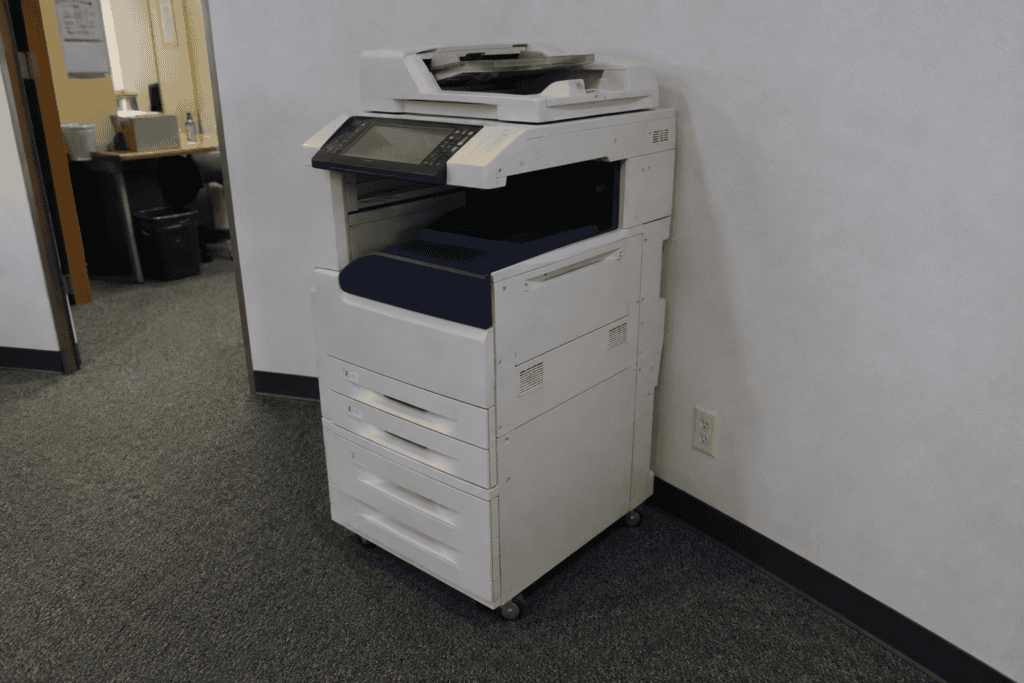
There is a common scenerio that happens in a lot of Vancouver offices.
A new printer arrives, everyone is excited about faster printing, better scanning, and fewer paper jams. The old printer gets pushed into a corner with the vague promise that someone will “deal with it later.” Then six months pass. But the printer is still there.
For businesses across Metro Vancouver, getting rid of an old office printer is not always as simple as putting it beside the dumpster. Large printers and commercial copiers can be heavy, awkward, difficult to move through an office, and unsuitable for ordinary garbage disposal.
And if you’re already dealing with an office move, renovation, downsizing, or commercial cleanout, the last thing you need is another piece of equipment becoming your problem.
That is where professional office printer removal service in Metro Vancouver can make life considerably easier.
At Provident Junk Removal, we help businesses clear unwanted office equipment, including printers and larger multifunction machines, so your staff do not have to spend half a morning wrestling a copier toward the elevator. Our business junk removal service is designed to make commercial cleanouts simpler, from the first item we pick up to the final cleared space.
Why Do Businesses Need Office Printer Removal?
Most office printers do not disappear because someone suddenly decides they hate printers.
There is usually a reason behind it.
A business might upgrade to a faster printer. A leased copier might be returned. An office could be moving to a smaller location. A company might be closing a branch, renovating its workspace, or clearing out a storage room that has slowly become a museum of outdated equipment.
Sometimes the printer simply dies.
And once it stops working, it can occupy the same amount of floor space as a functioning machine while providing absolutely none of the benefits.
For a small desktop printer, this may not be a huge headache. But commercial offices often have larger multifunction printers, copiers, scanners, and other equipment that can be surprisingly heavy.
What Types of Office Printers Can Be Removed?
Businesses may need to remove several different types of equipment, including:
- Desktop office printers
- Laser printers
- Commercial printers
- Large multifunction printers
- Office copiers
- Printer and copier combinations
- High-volume printing equipment
- Industrial printers
- Older or non-working printers
- 3D printers
- Printers being replaced during an office upgrade
Provident Junk Removal handles different sizes and types of office printers, from smaller office machines to larger commercial and industrial units.
The important thing is to tell us what you have when arranging the pickup. A large floor standing copier is a very different removal job from a printer that one person can carry under their arm.
Office Printer Removal During a Business Move
Moving offices is one of the most common times businesses discover just how much stuff they have accumulated.
You start with desks and chairs.
Then someone opens a storage room.
Suddenly there are old filing cabinets, broken electronics, boxes of outdated supplies, unused office furniture, and a giant printer nobody remembers ordering.
If you’re moving somewhere smaller, taking all of that equipment with you may not make sense.
This is where a proper office junk removal service can be useful.
Instead of loading unwanted printers or other stuff onto the moving truck, you can have them removed before moving day. That gives your movers less equipment to deal with and leaves your new office with less clutter waiting to be unpacked.
It can also make the final stages of a commercial move much less chaotic.
You do not want to be standing in an empty office at 5 p.m. on the last day of your lease wondering how you’re going to get a 300-pound copier out of the building.
Plan that part before moving day.
What About Large Copiers and Multifunction Printers?
A large multifunction printer can combine printing, copying, scanning, and faxing into one machine. Convenient when it works. Less convenient when it needs to leave the building.
The machine may be sitting against a wall with only a narrow path to the door. There could be an elevator involved. There might be stairs, tight corners, glass doors, or a loading area several minutes away from the office.
And commercial buildings tend to have their own rules.
Some require elevator bookings for large equipment removal. Others have designated loading areas or specific hours for moving bulky items.
Before scheduling a pickup, it helps to know:
- Where the printer is located
- Whether it is on the ground floor
- Whether an elevator is available
- Whether there are stairs
- How wide the doorways are
- How far the equipment needs to travel to reach the truck
- Whether building management has any removal requirements
These details help avoid surprises on pickup day.
Do You Need to Remove the Toner First?
If you are preparing an office printer for removal, check the toner or ink cartridge.
Removing cartridges before pickup is generally a good idea. If you are comfortable doing it, take them out and set them aside. If you are not sure how to remove the cartridge, do not start pulling random panels off the machine. Printers have a talent for turning a five minute job into a 45 minute headache.
When arranging a junk pickup with us, let our team know if toner or ink is still inside the printer. If assistance is needed, the team can help during the removal.
What Should You Do Before Your Office Printer Is Removed?
Modern office printers can do much more than print a piece of paper. Some multifunction machines store print jobs, scan information, email addresses, network details, address books, user information, or other business data. If the printer has internal storage, your IT department should check the manufacturer’s instructions for clearing or resetting that data before the equipment leaves the office.
This is particularly worth considering when a printer has been shared by an entire department or connected to the company’s network.
You should also remove:
- Printed documents
- Paper from trays
- Personal files
- USB drives
- Loose office supplies
- Any items sitting on or inside the machine
Do not assume that because the printer is broken, there is nothing worth checking. A broken printer can still contain perfectly readable documents.
How Much Does Office Printer Removal Cost in Metro Vancouver?
There is no single price for every office printer removal job.
A small printer sitting beside a ground-floor door is obviously different from several large multifunction copiers located upstairs in a commercial building.
The cost can depend on things such as:
- Number of printers
- Size and weight of the equipment
- Number of items being removed
- Location within the building
- Stairs or elevator access
- Distance to the loading area
- Amount of labour required
- Whether the printer is part of a larger office cleanout
This is one reason it is useful to describe the job when requesting a quote.
If you have photos, they can also help give the us a better idea of what we will be dealing with. And if you have more than just printers, mention that too.
What If You’re Clearing an Entire Office?
This is where printer removal can become part of a much bigger project.
Maybe your company is downsizing. Maybe you’re closing a location. Maybe the lease is ending. Maybe you’re renovating the office from floor to ceiling.
In those situations, the printer may be only one item on a very long list. There could also be old desks, chairs, filing cabinets, shelving, electronics, unwanted office equipment, and piles of miscellaneous junk. Instead of dealing with every item separately, a commercial junk removal service like Provident Junk Removal can help clear the unwanted material.
Provident Junk Removal provides junk removal for both homes and businesses and offers commercial junk removal services for businesses that need unwanted items cleared from their space.
Need Office Printer Removal in Metro Vancouver?
An old office printer has a strange way of becoming everyone else’s problem.
The IT department thinks facilities should handle it. Facilities thinks the office manager should arrange it. The office manager has 14 other things to deal with. And the printer continues sitting there, quietly occupying several square feet of valuable office space.
You can break that cycle.
Provident Junk Removal provides office printer removal and business junk removal services for businesses across Metro Vancouver. Whether you have one unwanted printer, several commercial copiers, or an entire office that needs clearing, our team can handle the heavy lifting and removal work for you.
Give us a call at +1 (672) 667-4238 or email info@providentjunk.ca to discuss your junk removal needs.